
Today marks the launch of Money Calendar, a personal finance app for Mac that shows every transaction exactly where it belongs - on the day it happened, right inside a calendar view.
Why a calendar instead of a spreadsheet
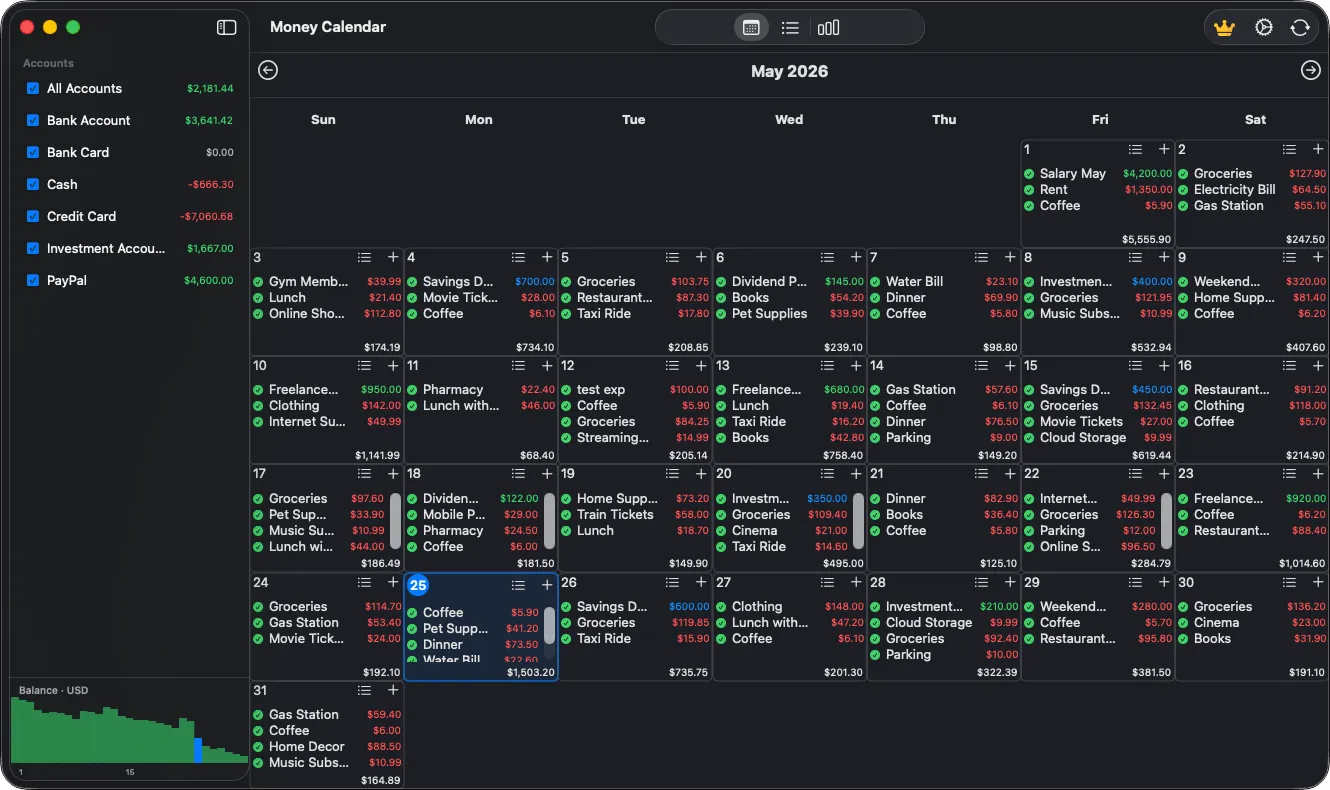
Most budgeting apps are just long lists of transactions you have to scroll through and filter to understand what's going on with your money. Money Calendar flips that: open a month and immediately see where your paycheck lands, when rent is due, and where that one unplanned grocery run happened. Income and expenses show up as color-coded chips directly on the date, and upcoming (unconfirmed) transactions are highlighted separately so you can see them coming.
What's in version 1.0
- Multiple accounts and currencies. Checking, savings, credit card - each with its own currency and exchange rate for any given date. Transfers between accounts are reflected on both sides automatically.
- Recurring transactions. Set up your salary, rent, or subscriptions once, and Money Calendar places them on the calendar automatically as upcoming entries - confirm them with a single tap when they clear.
- Reports and charts. Monthly balance trends, category breakdowns, and CSV export, all built in.
- Bank data import. Bring in transaction history from CSV and OFX files instead of typing it in by hand.
- Privacy by default. All data stays on your Mac - no required account, no cloud sync. Turn on optional SQLCipher encryption for extra protection.
Free, with an optional Pro upgrade
Money Calendar is free to download and use - the core feature set covers everyday budgeting. For anyone who wants more, an optional Pro upgrade is available as an in-app purchase.
Requirements
Money Calendar requires macOS 14 or later.
What's next
Version 1.0 is a foundation. Reports, recurring rules, and import are all areas we plan to keep improving - and feedback directly shapes what ships next.